Caner Akcasu Blog

< <

<
<
<


 Teraflops have been a popular way to measure "graphical power" for years. The term refers to the number of calculations a GPU can perform, but while it’s been on spec sheets forever, more recently the teraflop has gone mainstream, appearing in marketing messages found in the launch of consoles like the Xbox Series X. With GPU core counts reaching five figures, it’s nice to have a simple point of comparison. Unfortunately, teraflops have never been less useful.

The term teraflop comes from FLOPs, or "floating-point operations per second," which simply means “calculations that involve decimal points per seconds.” Tera means trillion, so put together teraflops means “trillion floating-point operations per second.”

The most popular GPU among Steam users today, NVIDIA's venerable GTX 1060, is capable of performing 4.4 teraflops, the soon-to-be-usurped 2080 Ti can handle around 13.5 and the upcoming Xbox Series X can manage 12. These numbers are calculated by taking the number of shader cores in a chip, multiplying that by the peak clock speed of the card and then multiplying that by the number of instructions per clock. In contrast to many figures we see in the PC space, it's a fair and transparent calculation, but that doesn’t make it a good measure of gaming performance.

Almost every GPU family arrives with these generational gains

AMD’s RX 580, a 6.17-teraflop GPU from 2017, for example, performs similarly to the RX 5500, a budget 5.2-teraflop card the company launched last year. This sort of "hidden" improvement can be attributed to many factors, from architectural changes to game developers making use of new features, but almost every GPU family arrives with these generational gains. That's why the Xbox Series X, for example, is expected to outperform the Xbox One X by more than the “12 versus 6 teraflop” figures suggest. (Ditto for the PS5 and the PS4 Pro.)

The point is that, even within the same GPU company, with each year, changes in the ways chips and games are designed make it harder to discern what exactly "a teraflop" means to gaming performance. Take an AMD card and an NVIDIA card of any generation and the comparison has even less value.

All of which brings us to the RTX 3000 series. These arrived with some truly shocking specs. The RTX 3070, a $500 card, is listed as having 5,888 cuda (NVIDIA’s name for shader) cores capable of 20 teraflops. And the new $1,500 flagship card, the RTX 3090? 10,496 cores, for 36 teraflops. For context, the RTX 2080 Ti, as of right now the best "consumer" graphics card available, has 4,352 "cuda cores.” NVIDIA, then, has increased the number of cores in its flagship by over 140 percent, and its teraflops capability by over 160 percent.

Well, it has, and it hasn’t.

NVIDIA cards are made up of many "streaming multiprocessors," or SMs. Each of the 2080 Ti's 68 "Turing" SMs contain, among many other things, 64 "FP32" cuda cores dedicated to floating-point math and 64 "INT32" cores dedicated to integer math (calculations with whole numbers). 

The big innovation in the Turing SM, aside from the AI and ray-tracing acceleration, was the ability to execute integer and floating-point math simultaneously. This was a significant change from the prior generation, Pascal, where banks of cores would flip between integer and floating-point on an either-or basis.
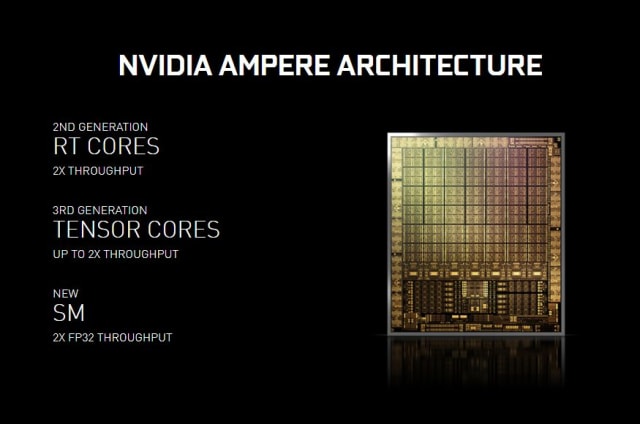
NVIDIA AMPERE SM
NVIDIA

The RTX 3000 cards are built on an architecture NVIDIA calls "Ampere," and its SM, in some ways, takes both the Pascal and the Turing approach. Ampere keeps the 64 FP32 cores as before, but the 64 other cores are now designated as "FP32 and INT32.” So, half the Ampere cores are dedicated to floating-point, but the other half can perform either floating-point or integer math, just like in Pascal.

With this switch, NVIDIA is now counting each SM as containing 128 FP32 cores, rather than the 64 that Turing had. The 3070's "5,888 cuda cores" are perhaps better described as "2,944 cuda cores, and 2,944 cores that can be cuda."

As games have become more complex, developers have begun to lean more heavily on integers. An NVIDIA slide from the original 2018 RTX launch suggested that integer math, on average, made up about a quarter of in-game GPU operations.

The downside of the Turing SM is the potential for under-utilization. If, for example, a workload is 25-percent integer math, around a quarter of the GPU’s cores could be sitting around with nothing to do. That’s the thinking behind this new semi-unified core structure, and, on paper, it makes a lot of sense: You can still run integer and floating-point operations simultaneously, but when those integer cores are dormant, they can run floating-point instead.

[This episode of Upscaled was produced before NVIDIA explained the SM changes.]

At NVIDIA's RTX 3000 launch, CEO Jensen Huang said the RTX 3070 was "more powerful than the RTX 2080 Ti." Using what we now know about Ampere's design, integer, floating-point, clock speeds and teraflops, we can see how things might pan out. In that “25-percent integer” workload, 4,416 of those cores could be running FP32 math, with 1,472 handling the necessary INT32. 

Coupled with all the other changes Ampere brings, the 3070 could outperform the 2080 Ti by perhaps 10 percent, assuming the game doesn't mind having 8GB instead of 11GB memory to work with. In the absolute (and highly unlikely) worst-case scenario, where a workload is extremely integer-dependent, it could behave more like the 2080. On the other hand, if a game requires very little integer math, the boost over the 2080 Ti could be enormous.

Guesswork aside, we do have one point of comparison so far: a Digital Foundry video comparing the RTX 3080 to the RTX 2080. DF saw a 70 to 90 percent lift across generations in several games that NVIDIA presented for testing, with the performance gap higher in titles that utilize RTX features like ray tracing. That range gives a glimpse of the sort of variable performance gain we’d expect given the new shared cores. It’ll be interesting to see how a larger suite of games behaves, as NVIDIA is likely to have put its best foot forward with the sanctioned game selection. What you won’t see is the nearly-3x improvement that the jump from the 2080’s teraflop figure to the 3080’s teraflop figure would imply.

With the first RTX 3000 cards arriving in weeks, you can expect reviews to give you a firm idea of Ampere performance soon. Though even now it feels safe to say that Ampere represents a monumental leap forward for PC gaming. The $499 3070 is likely to be trading blows with the current flagship, and the $699 3080 should offer more-than enough performance for those who might previously have opted for the “Ti.” However these cards line up, though, it’s clear that their worth can no longer be represented by a singular figure like teraflops.

Labels: , , , , , , , , , , ,

< <

<
<

<
<


There was a time when compromising on hardware for your DIY PC build meant seriously compromising on performance. But with AMD able to shrink down its transistor size to 7nm on its Zen 2 architecture, and Intel able to squeeze more and more out of its 14nm process for several generations, even the most budget of budget processors deliver fantastic performance at an extremely reasonable price.

I was really impressed with the value of AMD’s Ryzen 3 3100 and 3300X processors, which leveraged some key changes to make these budget CPUs worth far more than what they actually cost. But AMD isn’t the only one with budget CPUs. Intel has four budget CPUs to rival AMD’s two, and its cheapest $122 Core i3-10100 is nearly identical spec-wise to AMD’s $120 Ryzen 3 3300X. So, if you’re building your next PC on a tight budget, which one is the best?

Comparing these two processors shows that AMD still excels in multi-core workloads, and gaming frame rates at 1080p is mostly negligible. The real differences lie in power consumption, 4K performance with high-end and mid-tier graphics cards, and motherboard compatibility. If you’re building a budget PC, you might not care about 4K performance, but the results are still interesting!

For testing, I used the exact same set-up for both processors, except for the motherboards (Asus ROG Crosshair VIII Hero Wi-Fi X570 for AMD, and Asus ROG Maximus XII Extreme Z490 for Intel): RTX 2080Ti and RTX 2060 Super, G.Skill Trident Z Royal 16GB (2 x 8GB) DDR4-3600, Samsung 970 Evo NVMe M.2 SSD 500GB, Seasonic Focus GX-1000, and a Corsair H150i Pro RGB 360mm for cooling. It’s worth noting that the motherboards, graphics cards, and all-in-one cooler are overkill for a budget PC. The PSU is too. Yet I wanted to push these processors as much as I could to really find out which is the absolute best for your next budget build.

Features

Left: Intel Core i3-10100. Right: AMD Ryzen 3 3300X.
Photo: Joanna Nelius/Gizmodo

Before I get to the benchmarking let’s go over exactly what these two processors are. Both have some unique features that could sway a builder. This stuff can be kind of technical but I’ll try and break it down for you.

AMD Ryzen 3 3300X basic specs: 3.8 GHz base/4.3 GHz boost, 4-core/8-thread, 65W TDP

Intel Core i3-10100 basic specs: 3.6 GHz base/4.3 Ghz boost, 4-core/8-thread, 65W TDP

AMD’s Ryzen 3 processors mark the first time Simultaneous Multi-Threading (SMT) has ever appeared in any of its budget processors. SMT works like Intel’s hyper-threading, which splits the physical cores into virtual ones so each core can run two instruction streams at once. So this time around the Ryzen 3s have 4-cores/8-threads instead of only 4-cores/4-threads. More cores are almost always better as they allow a computer to process more data at once, but having more threads means that data can be processed faster. So you can run several programs at once and not have your computer lag or, heaven forbid, freeze.

Another neat thing about these CPUs is that if you have an older 400-series motherboard the Ryzen 3 3300X will still work with it. AMD is still using their AM4 socket and plans to keep it for a while longer, which helps keep the overall cost down of building a new PC.

AMD’s 3rd-gen Ryzen processors are also using a smaller transistor than Intel, 7nm compared to Intel’s 14nm. 7nm is effectively twice as dense as 14nm, and also more power-efficient. However, performance doesn’t necessarily scale with transistor-size; AMD generally lags in single-core performance and it’s why Intel has been the better CPU brand for gaming, even if AMD has drastically closed that gap between its 2nd and 3rd-gen processors. However, as you’ll see below, that’s not exactly the story with these budget processors.

Intel has had hyper-threading on its budget chips for much longer that AMD’s had SMT, so the i3-10100 has the same 4-core/8-thread breakdown as the Ryzen 3 3300X. Intel also has its Thermal Velocity Boost and Turbo Boost Technology 3.0, which adds up to 300 MHz of extra speed that it can give the i3-10100 to reach a max boost of 4.3 GHz if the temperature is below 65 C. AMD, in contrast, has its Precision Boost 2, which creates a higher multi-core boost clock with a fancy algorithm, but it also boosts clock speeds up to 4.3 GHz.

Unfortunately, switching to any one of Intel’s 10th-gen processors requires a new motherboard. The company has retired its LGA 1151 socket and moved to LGA 1200, which has more pins, so the 10th-gen processors literally will not fit into a 300-series or older motherboard. AMD’s motherboard compatibility makes the Ryzen 3 3300X the better choice in this case, unless you still have a 300-series mobo—you’ll need an upgrade if that’s the case due to some BIOS and other constraints.

As far as Intel’s 14nm process at this price point, it isn’t exactly a hindrance given that it can still achieve the same clock speeds, but it does start at a lower base clock, by 200 MHz. Based on that and the fact that AMD is still using the same socket, the Ryzen 3 3300X gives prospective buyers a better opportunity to save some money building a rig from scratch and upgrading it piecemeal later.

Winner: Ryzen 3 3300X

Benchmarks

Traditionally Intel is superior for single core benchmarks, while AMD does better in multicore benchmarks. Yet the Ryzen 3 3300X pulled off a surprise in our usual work productivity benchmark: a higher single core speed in Geekbench 4, 5342 compared to the i3-10100's 4967. CPU rendering in Civilization VI further cemented the Ryzen’s dominance here with a score of 7.4ms to the i3's 7.88 ms.

And Intel’s performance in multicore, Blender, and Handbrake is still lower than AMD’s: 15907 compared to the Ryzen’s 19913, 143 seconds slower in Handbrake, and 170 seconds slower in Blender.

Clearly, for 3D rendering and video transcoding tasks, even playing a CPU-heavy game like Civilization VI, AMD has the upper hand here. Not much else too it.

Winner: Ryzen 3 3300X

Gaming Performance

For this part of the testing, I ran benchmarks for Shadow of the Tomb Raider, Total War: Warhammer II, Far Cry 5, and Metro Exodus (ray tracing on and off) on ultra (or highest graphical setting) at 1080p, 1440p, and 4K with both an Nvidia RTX 2080 Ti and RTX 2060. Now, if you’re running games at 4K, it generally doesn’t matter what graphics card you have, because higher resolutions have diminishing returns, meaning that you’ll see the same frame rate with a budget CPU paired with a high-end GPU as you would a high-end CPU paired with a high-end GPU. However, Intel has a decent lead over AMD at higher resolutions, while at lower resolutions the two processors either tie or one pulls out ahead slightly over the other, depending on the game.

At 1080p, the Ryzen 3 3300X broke 100 frames per second with the 2080 Ti in Shadow of the Tomb Raider, while the i3-10100 was stuck in the mid-90s with the same graphics card. 1440p and 4K performance was near-identical between the two. It’s the same story with Far Cry 5, too. AMD has slightly better fps at 1080p and 1440, but bumping up the resolution to 4K, Intel takes the lead. AMD leads in Total War: Warhammer II at 1080p with the RTX 2080 Ti, but loses to Intel as the resolution gets higher

But Intel was ahead of AMD in Metro Exodus at all resolutions, which makes the i3-10100 the go-to CPU if you want ray tracing on a budget. You won’t get a consistent 60 fps, but you’ll get damn close.

While both AMD and Intel advertise their CPUs as gaming CPUs, Intel has owned that moniker a bit more in the last year or two. If graphically intensive games are your jam, you might want to look to Intel, as the i3-10100 gets the better performance even when paired with the same graphics cards as the Ryzen 3 3300X. Some games get along with one processor better over another, and while the difference at 1080p between the two chips is minuscule, Intel was consistently better at higher resolutions.

Winner: Core i3-10100

Thermals and Power Consumption

Intel is generally known for its lower CPU temps and power consumption, and that remains true for the Core i3-10100 compared to the Ryzen 3 3300X. Using HWInfo, I recorded both while playing Overwatch, Shadow of the Tomb Raider, and Metro Exodus on 1080p ultra (or the highest graphical setting) with both graphics cards, and found that the i3-10100 only got as hot as 52 degrees Celsius. The average temp was 43 C, and max power consumption was 38.5 W, which is much lower than the i3-10100 temperature threshold of 65 W.

In contrast, the Ryzen 3 3300X’s hit a max temperature of 68 C, an average temp of 44 C, and consumed up to nearly 58 W of power. (Its temperature threshold is also 65 W.) While pairing each processor with the RTX 2080 Ti instead of the RTX 2060 Super caused an increase of about 6 W for both processors, it’s clear that the i3-10100 still runs cooler and uses less power than the Ryzen 3 3300X.

HWInfo also reports power deviation on AMD motherboards/processors, which tells the difference between how much the CPU telemetry seen by the CPU differs from real-world data. Unlike Intel CPUs, Ryzen CPUs rely on the motherboard to determine their power consumption. What this HWInfo tool does is detect if motherboard manufacturer has tricked the CPU to run at a higher power than its advertised limit. Anything other than a 100% reading (which is more like 95%-105%) is not a completely unbiased baseline.

On average, the power deviation was 88%, not low enough to say there’s intentional biasing going on, but enough to raise an eyebrow. (AMD has gotten on motherboard manufactures in the past for intentionally providing wrong calibration data.) HWInfo has a great detailed thread about all this here if you want to dive into the really techy stuff, but it’s clear who the winner is in this category.

Winner: Core i3-10100

Winner

It’s clear that both are quality processors and you should feel comfortable spending $120 on either. Where one excels in one area, the other excels in another. Need a budget CPU to do more than gaming? Go with AMD. Want to game at a higher resolution and get the highest fps possible? Go with Intel.

But AMD is the better overall budget package. It works with more motherboards right now and should work with at least a generation or two of motherboards in the future. With Intel, you’ll have to buy a new motherboard, and there’s no guarantee it will work with future boards. AMD also fully supports future-proofing tech like PCIe 4.0 right now. Intel does not.

It’s likely that Intel will support PCIe 4.0 in the future, but you’ll need to buy a brand-new CPU and motherboard if that’s the case. Sticking with AMD future-proofs you for much longer, and when you’re building a PC on a budget that absolute matters. Thus, AMD wins.

Labels: , , , , , , , , ,

<

AdSense Reklam Alanı