You can now search for videos with your voice on YouTube mobile even while you're casting to a bigger screen. The Google-owned platform has announced the feature, which works on both iOS and Android devices, along with the revelation that it's now possible to watch YouTube in HDR on the PS4 and the PS4 Pro. YouTube's post also talked about the other capabilities it rolled out over the past year. Those include "Who's Watching," a feature that lets you switch between the profiles linked to the device you're watching on, as well as YouTube's debut on Amazon Fire TV devices.
The platform has more cast-related features in the works, as well. German site SmartDroid (via Android Community) has spotted what seems to an experimental feature rolling out to select Android users, which turns the mobile YouTube app into more of a bona fide remote control while you're casting.
At the moment, you can only pretty much use the app to pause, play and adjust the volume while you're casting to a TV. The updated controls, however, show a directional pad that makes it easier to browse videos, and include quicker access to captions and playback quality settings. You'll be able to access those new elements through the volume panel that pops up when you tap on the cast button -- that is, so long as you're one of the users lucky enough to get the feature.
Want to know how Google’s Pixel 5 supports wireless charging despite a predominantly metal body? Google explained the essence of how it works, but a video teardown at PBKReviews (via 9to5Google) has eliminated the mystery altogether. There’s a large cutout in the middle of the otherwise aluminum shell that lets the wireless charging coil work its wonders — the bio-resin plastic you see on the outside merely gives the illusion of an uninterrupted surface.
The design is more familiar beyond that, with a few twists. Google has tucked millimeter wave 5G antennas near the volume rocker and top edge, and clips keep the screen firmly attached to prevent a repeat of issues with some Pixel 4 units. There may be further room for improvement, though. iFixit noted that Google is using a mainboard much like that on the Pixel 4, limiting the amount of room for a larger battery and other components.
The teardown reflects Google’s play-it-safe approach to the Pixel 5. While it’s willing to use a clever trick to add a staple feature like wireless charging, this isn’t a radical reinvention. The company is focused on delivering the fundamentals at a competitive price, and that apparently involves a conservative design.
Streaming musicstill has a lot of room to grow, it appears. Counterpoint Research hasdeterminedthat paid music subscriptions jumped 32 percent in 2019 to reach 358 million thanks to a mix of exclusives,phone service bundles, regional price cuts and extended trial periods. Not that the services will want to get complacent -- competition is heating up, according to analysts.
Spotify still had a solid lead at the end of 2019 with 35 percent of subscriptions. However, its rivals are growing fast. Apple Music's listener base grew 36 percent to give it 19 percent of streaming, while Amazon's share grew by half to hit 15 percent. This put them comfortably ahead of rivals like Tencent (11 percent) and YouTube Music (6 percent). The remaining 14 percent of tended to be split between regional giants like India's Gaana and Russia's Yandex Music.
It's not certain how much more headroom there might be. Counterpoint predicted that streaming music would grow another 25 percent in 2020, but it also warned that the COVID-19 pandemic might hurt. Habits are unsurprisingly skewing more toward radio and TV news, and that leaves fewer people willing to subscribe to services meant chiefly for entertainment.
As wildfires continue to tear through parts of California and Colorado, Google has launched new tools to help people stay informed about their progress. Starting today, Google search queries for information about the fires will turn up more than just news stories and alerts -- they'll also display maps of the fires' boundaries. The Google Maps app will display the same wildfire boundaries to people attempting to enjoy the height of summer nearby, and will also provide warnings and "ambient alerts" to those who begin to approach affected areas.
But here's the most important part: That crucial fire map information is being updated hourly. To make sure people get the most accurate view possible, Google has been using its Google Earth Engine's analytics tools to monitor imagery provided by the National Oceanic and Atmospheric Administration’s four GOES satellites. Those satellites can't directly "see" the flames, but they can see the prodigious plumes of smoke those flames produce, along with the sizable thermal hotspots that signify areas of intense fire activity.
Google's tools here aren't new, strictly speaking -- the search giant piloted this map boundary feature during last year's wildfire season with input from emergency services officials in California and Colorado. That said, they're likely to be especially helpful this year.
As Google's Crisis Response Lead Yossi Matias pointed out in a blog post, the National Interagency Fire Center is forecasting above-normal wildfire potential throughout the United States with a window of risk that extends at least through September. And of course, the potential for devastating wildfires extends well beyond the US: Large swaths of Canada's prairies could also be at risk, and as of the end of July, wildfires in Russia had burned an expanse of forests and steppes larger than Greece. Unfortunately, these public-facing fire tracking tools remain exclusive to the United States for now, but a Google spokesperson confirmed to The Verge that the company hopes to roll them out internationally in the future.
A little more than a year after its live streamed debut at the 2019 Geneva Auto Show, the Polestar 2 is finally ready to hit the streets. Engadget took the $60,000 premium electric vehicle for a drive this week to see how this EV fastback handles the challenging curves of the Santa Cruz hills.
The five-door Polestar 2 is outfitted with a 78kWh reinforced battery pack that delivers power to a pair of motors -- one each over the front and rear axles -- to produce 408 hp and 487 ft-pounds of torque with a range of 291 miles. However, if you opt for the $5,000 Performance pack that upgrades the suspension and brakes, along with 20-inch aluminum rims (instead of 19s) and gold-colored seat belts, the mileage will decrease noticeably. During my test drive in the Performance model, I started with a reported range of 210 miles at 100 percent battery charge. Even without the added performance though, the Polestar 2 can hit 60 mph from a standstill in 4.45 seconds, do a quarter-mile in 12.76, and tops out at just over 125 (electronically limited) mph.
Cargo capacity is at a premium inside the vehicle, with just 15.5 cubic feet of storage space unless you fold the rear seats down. That said, if you’re looking to haul groceries rather than a whole lot of ass, this might not be the EV for you. You might instead consider the Hyundai Kona Electric or Kia Niro EV, because this EV is certainly not an electric SUV.
The Polestar 2 was a blast to drive through the twists and turns of CA-35. Thanks to the electric motors’ instant access to torque, a mere flick of the gas pedal at the apex of a curve had me blasting out of it faster than when I entered. That quick acceleration was apparent in normal city driving both in the relative bustle of midmorning downtown San Francisco and the sleepy, sweltering sprawl of suburban Los Gatos. The one-pedal driving system proved to be pretty useful in light city traffic, enabling me to automatically slow to a crawl simply by lifting my foot off the gas. That feature can be turned off if you prefer a two-pedal driving experience. I had no trouble keeping up with traffic either on city streets, multilane boulevards or at freeway speeds. Especially at freeway speeds. It easily kept pace with the flow of traffic — even when that flow might have exceeded the posted speed limit.
Polestar / Beadyeye
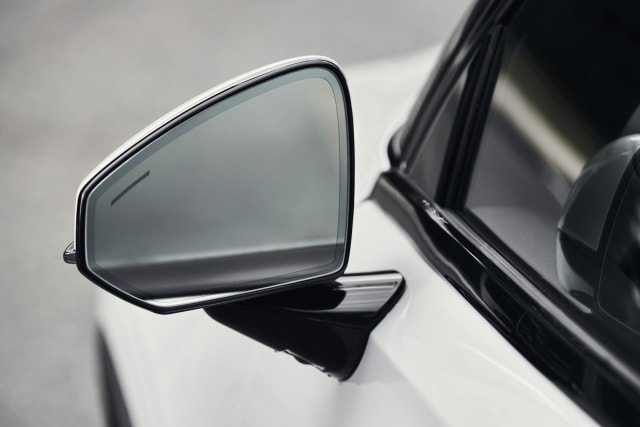
Your biggest concern will be making sure that the lane next to you is clear when you do try to pass because the Polestar 2’s blindspots are big enough to hide a MAC truck in. The A-pillars are broad, as are B-pillars. Plus, the side mirrors have been minimized to lower the drag coefficient, but they only give you a tiny peek at what’s in the lane next to you. I’d gladly take the reduced range if it meant I could get a better look at the traffic around me from larger mirrors.
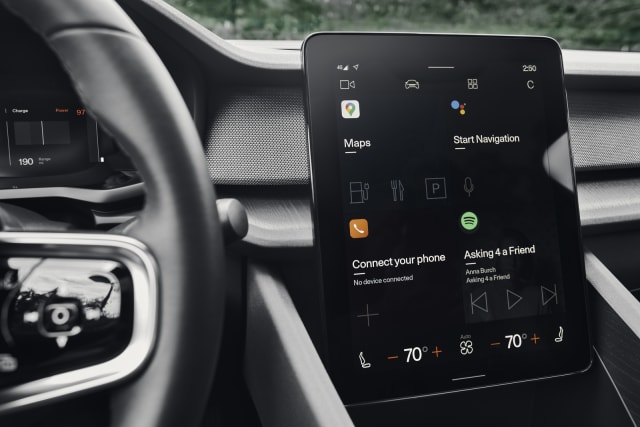
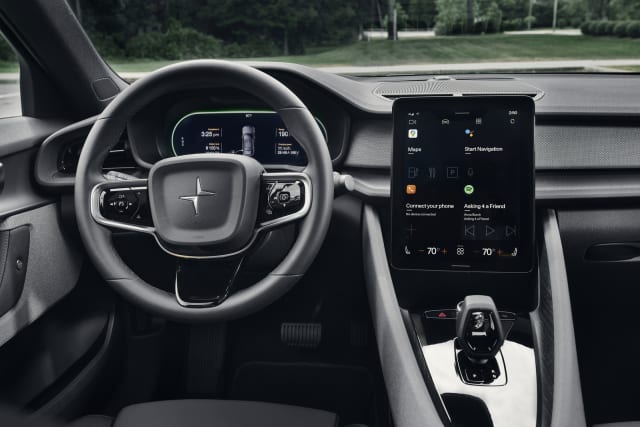
The centerpiece of the Polestar 2 is the vehicle’s fancy center console. It replaces virtually every knob, dial and switch with an 11-inch screen running one of the first versions of Android Automotive OS available to third-parties. Aside from the window and mirror controls, door locks and gear shift, everything is run through what looks like an iPad Pro set in portrait mode and crammed against the front of the dash. I’ve never been much of a fan of these sorts of controls. The idea of hunting through multiple sub-menus on a glorified tablet while navigating rush hour traffic has always given me the heebie-jeebies, but the AAOS system is remarkably straightforward and intuitive. I never tapped more than a couple times to get to the control I was looking for.
Polestar / Beadyeye
That’s not to say there isn’t a learning curve. I spent 10 sweltering minutes in 98 degrees weather trying to turn on the A/C for the first time but after that, the process took seconds. And to be fair, I could have just not been stubborn and said, “Hey Google, turn on the air conditioning and set the temperature to 68 degrees.” Because that works too and it’s pretty cool.
Typically when you pair your smartphone to your car’s infotainment system, it simply mirrors the phone’s functionality. AAOS, on the other hand, is a standalone system meaning you won’t have to physically plug your phone into it -- though you will need a Bluetooth connection to make calls and send texts.
Instead, you simply link the infotainment to your Google account. Doing so enables a deeper degree of integration, enabling drivers to use their preferred options when dealing with Maps for navigation, Google Play for media or Assistant for voice assist. What’s more, according to the Polestar press kit, if you’ve already own a Google Home, congrats, your Google account already has a bunch of recordings of your speech patterns so the infotainment system will more clearly understand you from the get-go.
“From a security perspective, similar things that we have on the phone are things that also exist in the vehicle,” Haris Ramic, Google product lead for Android Automotive, told Engadget. “So for example, you can go set it up, if you lock your account, it gets encrypted. And [to access that encrypted data] you have to either enter a PIN into the vehicle or sometimes to do something on the phone [such as 2-factor authentication] to open it up. When the vehicle does shut down, the user partitions, which is the area where all the user information is stored, also get encrypted.”
What’s more, Google is being cautious as to which companies are being allowed access to its fledgling OS’ APIs. “The goal is, obviously, not to focus just on big companies because innovation can come from anywhere. We don't want to provide a set of API's that anybody can use,” Ramic continued. “But partially the reason why we're going so slow is, rather than just opening up everything and saying anybody can develop anything they want, we're targeting areas where we know there's a lot of consumer value.”
Logging in to the infotainment system is not a requirement, mind you, it will work just fine without your credentials, just not with the same degree of personalization (and data privacy exposure) as if you did. During my test drive, I used a generic account provided by Polestar and paired my phone via Bluetooth. So while it wouldn’t play songs from my Google Music account, I still had easy access Maps, Assistant and Spotify.
Polestar / Beadyeye
Assistant was surprisingly effective and intelligent during the four-plus hours I had to play with it. I didn’t have to manually input any destinations, simply told Assistant where I wanted to go and the system automatically generated a route. This was way, way easier than the navigation experience we saw with the Cooper SE back in January. Assistant was generally unfazed by background noise, quickly responding over the sounds coming from the Polestar’s 16 speaker Harmon Kardon stereo system and really only got bogged down when trying to understand me while I shouted commands with the windows down at freeway speeds.
It did return a few incorrect results when I asked it to play specific bands. For example, when asked it to play The Coup, Spotify loaded up “In the Coupe” by Curren$y and Harry Fraud instead, or when I requested Chika, I got Chica. And yet somehow when I asked for Fear and Loathing in Las Vegas, the system correctly loaded “Return to Zero“ without hesitation. Whether that’s a shortcoming of Assistant’s ability to parse language or Spotify simply not having those artists in its catalog is something I couldn’t discern during the few hours I had the car. But it definitely made me long to have access to my existing Google Music playlists.
One issue I did run into was the fact that streaming media requires a 4G/LTE connection and when picking my way through the Santa Cruz hills, I often ran into service dead zones which would cut the music until the signal was restored (thankfully, it didn’t impact navigation.) This goes for streaming services like Google Music or Spotify as well as FM and AM radio stations (which are also streamed via an onboard app because AM radio signals play havoc with EVs.) Luckily you can easily get around this issue by making a hard connection between your phone and the system via one of four USB-C ports and playing media directly from the phone’s hard drive if you don’t want to chance it. The console also offers a 15w charging pad for induction-capable phones.
Volvo’s influence (as part-owner of the brand) is apparent in the vehicle’s broad array of safety and driver assist features. It will feature Level 2 ADAS, namely Pilot Assist (which is already being deployed in Volvo models like the V60 and the XC90) -- it provides acceleration, braking and steering up to 81 mph; blindspot, rear crash, and cross-traffic alerts; a lane-keeping aid, crash mitigation and avoidance. It even keeps an eye on the driver to make sure they’re staying focused on the road. That’s not to say it has cameras monitoring the driver or anything, the attention monitor is based on steering wheel contact. One unique safety feature of the Polestar 2 is its front inner-side airbags. These are mounted on either side of the center console and are designed to protect both driver and passenger from either shattering their femurs against the console or slamming into one another in the event that the vehicle gets hit from the side.
The car’s body is constructed from stamped steel with five paint options and a pair of interiors made from vegan materials, but if you want the Napa leather, it’s available for four grand extra. Why you’d spend that, I have no idea. The standard Weavetech seats are made from cork and recycled plastics (sans the phthalates which typically are used to increase material flexibility) and are very comfortable. The seat upholstery looks like leather but breathes like cotton -- even in triple-digit temperatures my backside remained dry.
Polestar is already working on three OTA updates for the coming months: a digital key similar to what we saw from Apple and BMW in July. That’s arriving later this year, as is a “connected safety” feature. Apple CarPlay compatibility should be ready by early 2021. If you’ve already got a preorder registered with Polestar, the first batch of vehicle deliveries should start arriving in September. Unfortunately, if you put down a deposit today, you’re looking at a December delivery date. Unusually spec’d orders (that is, color, interior and package combinations that not many people are asking for) are looking at a potentially similar time lag.
Google has spent years trying to reduce Chrome’s notorious appetite for memory, and it’ll soon offer a substantial improvement for Windows 10 users. WindowsLatest has learned (via MSPowerUser) that a Google engineer recently revealed that a future Chrome release will use a technique from Microsoft Edge to lower RAM usage and theoretically boost performance. Chrome will switch to “Segment Heap” memory management that, in Microsoft’s experience, cut memory use by 27 percent.
The improvements in Chrome could vary wildly depending on the system, but tests indicated that it could sometimes save “hundreds of MB” in the browser and system processes. “Many-core” systems are most likely to see the largest benefit, the engineer said.
You should see the feature soon after Google can build Chrome using the right Windows 10 developer kit. This won’t necessarily lead to massive improvements in performance, but it could help if you either have limited memory in your system or simply like to keep many browser tabs open.
New feature can deep-link to specific text on a Web page, with highlighting.
Google has been cooking up an extension to the URL general referred to as "textual content Fragments." the brand new link style will allow you to link not just to a web page but to distinct textual content on a page, for you to get scrolled to and highlighted automatically once the web page masses. It's like an anchor hyperlink, however with highlighting and creatable by using anyone.
The feature has definitely been supported in Chrome for the reason that version eighty, which hit the stable channel in February. Now a new extension from Google makes it effortless to create this new hyperlink style, in order to work for someone else utilising Chrome on laptop OSes and Android. Google has proposed the thought to the W3C and hopes other browsers will adopt it, however although they don't, the hyperlinks are backward-suitable.
The syntax for this URL is pretty unusual watching. After the URL, the magic is within the string "#:~:text=" after which whatever text you need to check. So a full link would seem like this:
https://en.Wikipedia.Org/wiki/Cat#:~:textual content=Most breeds of cat have a famous fondness for sitting in high areas
for those who reproduction and paste this into Chrome, the browser will open Wikipedia's cat web page, scroll to the primary textual content that matches "Most breeds of cat have a noted fondness for sitting in high areas," and can spotlight it. If the text would not healthy something, the page will still load. Backward-compatibility works on the grounds that browsers currently help the number sign (#) as a URI fragment, which traditionally gets used for anchor hyperlinks that are made via the web page creator. If you paste this into a browser that does not aid it, the web page will still load, and everything after the number sign will simply be ignored as a foul anchor link. Up to now, so excellent.
One predicament is that this means that you could have areas in a URL. On a webpage or discussion board, which you could hand-code the link with a href tag (or something the non-HTML an identical is) and everything will work. For instant messengers and social media although, which don't allow code and use automatic URL parsers, things get a little more tricky. Each URL parser treats a space as the end of a URL, so you'll ought to use percent-encoding to exchange all the areas with the an identical "%20." URL parsers now have a shot at linkifying this accurately, nevertheless it looks like a large number:
Areas aren't the one characters that may cause issues. The commonplace RFC 3986 defines a number of "reserved" characters as having a specific which means in a URL, so they is just not in a URL. Internet-page-authoring tools are likely to handle these characters automatically, but now that you are embedding arbitrary sentences in a URL for highlighting, there may be a greater hazard you can run into such a reserved characters:! * ' ( ) ; : @ & = + $ , / ? # [ ]. All of them must be percentage-encoded to ensure that the URL to work, and Google's extension takes care of that for you.
Google's new Chrome extension, called "link to textual content Fragment," (it's also on Github) will put a brand new entry in Chrome's correct-click on menu. You simply highlight textual content on a web page, right-click it, and hit "reproduction link to selected textual content." Like magic, a textual content fragment hyperlink will end up for your clipboard. All the textual content encoding is done mechanically, so the hyperlink should work with most web sites and messengers.
Google looks as if it will pushing out support for text fragments throughout its internet ecosystem, even without the W3C. The links have already began to exhibit up in some Google search results, which enable Chrome users to zip correct to the relevant textual content. It's generally best a topic of time earlier than hyperlink production moves from an extension to a natural Chrome feature.